Objective -
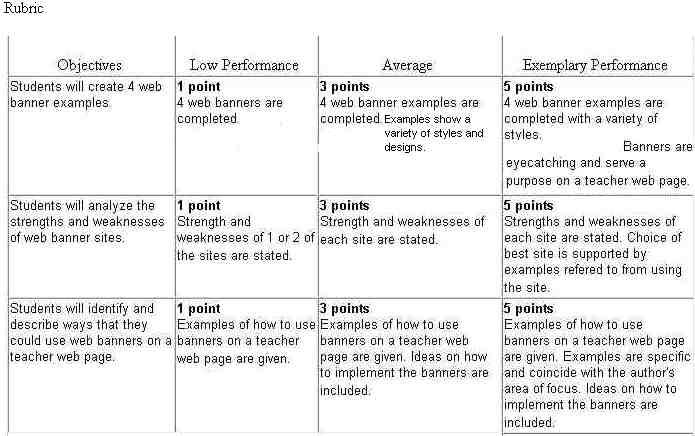
Students will be able to create banners for teacher web pages.
Introduction -
You are looking up a web site when at the top of the screen a message tells you that if you click on the monkey you may win $300. Without thinking, you click on the monkey. As you wait for a form to appear to send your prize money to you, a web site appears for a company trying to sell you something. What happened to the monkey? Where is my money? Once again, the web banner has snagged another victim.
Web banners are used to catch the net surfers eye. Many contain attractive graphics or animations and are used to advertise products. Most of the time, clicking on the banner takes the unsuspecting web user to a location they really did not want to visit. Banners can also be used to attract attention on a teacher web page. On a teacher web page, banners can generate interest and make the web page look more professional. In this activity, you will be given a chance to design some web banners.
Activity
You do not have to be a computer code slinger to create web page banners. There are many sites that allow you to input text and select a style and font for a banner to be created. You will create a banner using 4 different web sites to examine the strengths and weaknesses of each site.
Assignment
Create a banner with each site for use with a teacher web page. Post
your examples on a web page titled Banner Examples. Have a link
to your banner page from your index file. On the same page, write a paragraph
explaining which site was the best and what made that site the best one
to use for creating your banner.
Links
ABC banners http://www.abcbanners.com/abcbanners.exe
Banners http://www.crecon.com/banners.html
Banner code http://engine.coder.com/creations/banner/banner-form.pl.cgi
Animation Online
http://www.animationonline.com/