Connie Lippenholz
LS521, Su02
7/16/02
Elective - Search Tips (Utilities)
Searching the Internet
Introduction: Everyone has had the awful experience of searching on a topic and getting all the wrong results... so how can you get the right results? The following search tips and examples will help you find the right web sites, the first time, every time...
Activity:
|
TIP |
EXAMPLE | EXERCISE |
|
Tip #1: Find two to three good search tools to start your searches with |
Search Engines: Google, AltaVista, AlltheWeb, Teoma
|
Visit at least two of the listed search engines or engines you have previously used. Enter the same simple keyword search in each engine. How many pages did you get in your results?
|
|
Subject Directories: About.com, Yahoo!, Librarians' Index
|
Visit at least two of the listed subject directories or directories you have previously used. Try to conduct the same simple keyword search that you used for the search engines. How many pages did you get in your results?
|
|
|
Tip #2: Know how to use your favorite search engines' "Advanced Search" abilities to narrow your search criteria
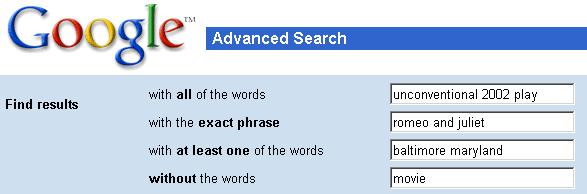
(Example shown using Google's Advanced Search.)
|
|
|
|
WITH ALL OF THE WORDS: Use
this field to list all the words that would always appear on the perfect
page.
|
In the search engine that received the most results for exercise #1, find that site's Advanced Search. In the "with all of the words" field, list all of the additional words that you would want to appear on the perfect page: __________________________________________ __________________________________________ How many results do you have now? _______________ |
|
|
WITH THE EXACT PHRASE: Whenever possible, search for an exact phrase if the words are always listed in that order and format. If the search engine does not have this field as an advanced search feature, use quotation marks around the phrase to indicate you want it searched as a whole.
|
In the "with the exact phrase" field, list any appropriate phrase for your search: _________________________________________ _________________________________________ How many results do you have now? ______________ |
|
|
WITH ANY OF THE WORDS: enter any synonyms that you want included in your search.
|
In the "with any of the words" field, list any keywors and associated words that may be interchanged on your perfect page: _________________________________________ _________________________________________ How many results do you have now? ______________ |
|
|
WITHOUT or NONE: use this field to list multiple meanings of your search words that you do not want to show up in your results.
|
In the "without" field, list all of the associated words that you do not want on your perfect page: _________________________________________ _________________________________________ How many results do you have now? ______________ |
|
|
Tip #3: Trim the URL
|
Often, a webmaster will reorganize the site, and a link will be "broken". When this happens, you can simply back out of each portion of the link until you find a page that works, then try to re-enter through that page's links. This skill is also useful if you find a site that really interests you, and you want to see if there are other "nearby" sites that you may also like. Note: sometimes you may get the response that you are not authorized to view that page... don't stop trying! Usually you can regain access at the homepage (see example below). Other times, the homepage may not be something you are interested in. |
Go to: http://nancykeane.com/booktalks/avi_true.htm While researching the author Avi, you decide you want to see what else this site has about him... so back up the address to http://nancykeane.com/booktalks/ And this site has you really interested, so you want to see what other authors and booktalks Nancy Keane has to offer... http://nancykeane.com/
Try these other sites and list other treasures you were able to find:
|
|
Example: if you were to open http://www.plainfield. k12.in.us/hschool/webq/webq31/food.htm you would find a nutrition-based WebQuest. If you back up to http://www.plainfield.k12.in.us/hschool/webq/webq31/ you will be told that you are not authorized to view this page. But don't stop trying! Once you back out to http://www.plainfield.k12.in.us/hschool/, you will have access again, and may be able to find more interesting projects! |
||
|
Tip #4: Look for "similar pages" once you've found a format or topic you like
|
Search engines have the ability to look for pages with similar kywords, formats and links. So when you find one page that you like, you can search for other pages just like it! |
Compare the "like:" or "similar" functions of at least two search engines, to see how many similar web sites you can find for:
|
|
Example: You really enjoyed reading book reviews by other students at www.spaghettibookclub.com. Let's see what other sites we can find that are similar to it: Using the "like:___" command, AlsaVista shows us 12 similar pages:
Google gives us 26 similar pages, using its Advanced Search "Similar" field:
|
||
|
Tip #5: Look for pages that link to a page that you like
|
Another method of finding similar pages is to find the pages that link to the page you enjoyed, assuming that they will be similar. |
Compare the "link:" function or "Links" field of at least two search engines, to see how many similar web sites you can find for:
|
|
Let's see what other sites we can find that are linked to spaghettibookclub.com: Using the "link:___" command, AlsaVista shows us 11 similar pages:
Google gives us 2,440 similar pages, using its Advanced Search "Links" field:
|
||
Remember! No search engine is able to search the entire web... at most, you are searching about 1/3 of the web for each search. Don't give up!
Resources:
Types of Search Tools <http://www.lib.berkeley.edu/TeachingLib/Guides/Internet/ToolsTables.html>
Four NETS for Better Searching <http://webquest.sdsu.edu/searching/fournets.htm>